Showing posts with label Accessibility Testing. Show all posts

Monday, March 20, 2023

WAI ARIA ( Web Accessibility Initiative – Accessible Rich Internet Applications) Reflection

 We all know by definition ARIA is Web Accessibility Initiative – Accessible Rich Internet Applications. According to W3C WAI-ARIA, the Accessible Rich Internet Applications Suite, defines a way to make Web content and Web applications more accessible to people with disabilities. It especially helps with dynamic content and advanced user interface controls developed with HTML, JavaScript, and related technologies.

When not to use ARIA?

  • ARIA should not be used to duplicate the behavior of native HTML features. For example, using ARIA to add a role of "button" to a div element that behaves like a button is unnecessary when the button element itself is already available in HTML.

<div id="saveChanges" tabindex="0" role="button" aria-pressed="false">Save</div>

The above example creates a focusable button, but requires JavaScript and CSS to include button appearance and functionality. These are features provided by default when using the <button> and <input> with type="button" elements:

<button type="button" id="saveChanges">Save</button>

  • ARIA should not be used to add cosmetic effects to elements that do not convey any meaningful. For example, using ARIA to add an animation to an element is unnecessary if it does not provide any valuable information.
  • ARIA should not be used to provide misleading information to users with disabilities. For example, using ARIA to describe an element as "hidden" when it is actually visible can cause confusion. How many of you seen aria-hidden='true' on a focusable element?
  • ARIA should not be used to add unnecessary complexity to the website code.
By using ARIA appropriately on the other hand on appropriate  user interfaces, developers can improve the accessibility of their websites and applications for all users, including those with disabilities.

Some most common scenarios where ARIA been used for providing much needed great user experience :
  • Drag and drop: Gmail allows users to drag and drop emails and attachments to move them between folders or compose new messages.
Image that shpws how Gmail allows users to drag and drop emails and attachments

  • Hashtags and mentions: Instagram uses ARIA to provide additional context and information about hashtags and mentions in posts and comments. 
Image of a source code from Instagram that show how  Instagram uses ARIA to provide additional context and information about hashtags and mentions in posts and comments

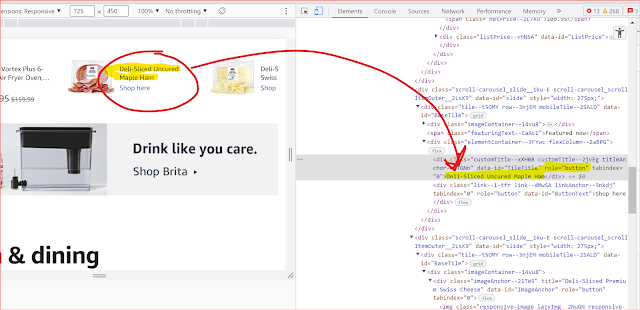
  • Carousel sliders: Amazon uses carousel sliders to showcase product images and information on various pages of the website.        
Image that shows Carousel sliders: Amazon uses carousel sliders to showcase product images and information on various pages of the website.
  • on LinkedIn, when we add a new job experience to our profile, there is a drop-down menu where we can select the type of employment (e.g. full-time, part-time, self-employed, etc.). LinkedIn uses ARIA to provide additional information about this drop-down menu to users who are using assistive technology such as screen readers.
Image that shows the source code on LinkedIn, when we add a new job experience to our profile, there is a drop-down menu where we can select the type of employment (e.g. full-time, part-time, self-employed, etc.). LinkedIn uses ARIA to provide additional information
By using ARIA appropriately and sparingly, web developers can help ensure that their websites are accessible and usable for all users, including those with disabilities who are using assistive technology.


Some Useful ARIA Resources:

Monday, March 13, 2023

Manual Testing List

Manual testing requires a person to view and interact with the website or application. This type of testing is often done through user testing with people with disabilities, as they are experts in their lived experience and assistive technology. This is highly recommended, as it allows for an in-depth understanding of how the website or application works and how it can be improved for people with disabilities. 

Manual Testing Checklist 

Allow users to save data after a session timeout

Define status messages in markup

Don't use flashing lights

Get rid of background noise in audio

Describe errors to users

Make all functionality available through the keyboard

Make multiple types of input available

Make sure the user knows where they are

Make sure there are no keyboard traps

Make time limits adjustable or not essential

Prevent errors when handling legal and financial data

Provide ASL interpretation of video

Provide a way to expand abbreviations

Provide a way to pause audio that plays automatically

Provide a way to turn off character key shortcuts

Provide a way to turn off moving content and animation triggered by interaction

Provide a way to zoom in and resize text up to 200%

Provide audio descriptions of videos

Provide captions

Provide consistent UI components

Provide conventional interactions (instead of motion-activated interactions)

Provide media alternatives of video

Provide more than one way to locate a page

Provide pronunciation for ambiguous words

Provide the option to turn off interruptions

Use suggestion for corrections of errors

Use consistent navigation

Use hover and focus best practices

Use responsive layouts 

Use single-pointer gestures

Warn users about timeouts (No surprise to users)

Write descriptive link text   

Write clear instructions 


Thursday, March 9, 2023

WCAG 2.1 (Web Content Accessibility Guidelines 2.1) at a glance : 78 Success Criteria (Level A,AA,AAA)

 WCAG 2.1 (Web Content Accessibility Guidelines 2.1) is a set of guidelines developed by the W3C (World Wide Web Consortium) to ensure that web content is accessible to people with disabilities. WCAG 2.1 is an update to the original WCAG 2.0 guidelines and includes additional success criteria to improve accessibility. Some of the key success criteria in WCAG 2.1 include:


Non-text Content: All non-text content that is presented to the user should have a text alternative that serves the same purpose as the non-text content.

Time-based Media: All pre-recorded audio and video content should have captions, and all live audio and video content should have both captions and an audio description.

Adaptable: Content should be presented in a way that is easy to understand and navigate, regardless of the user's abilities or the technology they are using.

Distinguishable: Content should be presented in a way that makes it easy to see and hear, including providing sufficient color contrast, ensuring that text is resizable, and minimizing background noise.

Keyboard Accessible: All functionality should be available through a keyboard interface, allowing users to navigate and interact with content without relying on a mouse.

Enough Time: Users should have enough time to read and use the content, including providing enough time to complete tasks, and avoiding time limits for completing tasks.

Seizures and Physical Reactions: Content should be designed in a way that does not cause seizures or physical reactions in users with photosensitive epilepsy or other sensitivities.

Navigable: Content should be organized in a way that makes it easy to navigate and understand, including using headings, labels, and other organizational tools.

Input Modalities: All functionality should be available through a variety of input methods, including touchscreens, keyboards, and voice commands.

Readable: Content should be presented in a way that is easy to read, including providing sufficient spacing between lines of text, using easy-to-read fonts, and avoiding text that is too small.

Predictable: Make web pages available in a predictable way.

Input Assistance: Help users to avoid and correct mistakes. If an input error is automatically detected, the item that is in error is identified and the error is described to the user in text. If an input error is automatically detected and suggestions for correction are known, then the suggestions are provided to the user, unless it would jeopardize the security or purpose of the content.

Compatible: Maximize compatibility with current and future user agents, including assistive technologies.

29 Success Criteria of Perceivable Listed

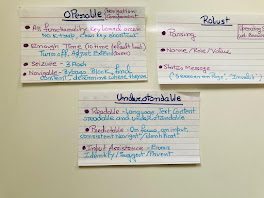
Operable, Understandable and Robust success criteria listed


These success criteria are designed to help make web content more accessible to people with disabilities, ensuring that everyone has equal access to information and functionality on the web.

Why we should follow WCAG 2.1 guideline for Digital Accessibility?

Legal Compliance: In many countries, including the United States, following the WCAG guidelines is a legal requirement for public and government websites. Failure to comply with these guidelines can result in legal action against the website owner or operator.

Ethical Responsibility: Making web content accessible to people with disabilities is a matter of social responsibility and ethical considerations. All individuals should have equal access to information and services provided online.

Increased Audience: By following the WCAG guidelines, websites can ensure that they are accessible to a wider audience. This includes people with visual, auditory, physical, and cognitive disabilities who may otherwise be excluded from accessing the website.

Improved User Experience: Web content that is accessible to people with disabilities often has benefits for all users, as it is typically more user-friendly, navigable, and readable.

Future-Proofing: Following the WCAG guidelines ensures that your website will be compatible with future technologies and devices, which is important as technology continues to evolve and expand.

Overall, following WCAG 2.1 guidelines is important to ensure that your website is accessible to all individuals, including those with disabilities. It not only meets legal requirements but also reflects ethical responsibilities and best practices for creating a better online experience for all users.

Thursday, March 2, 2023

A reflection of my IAAP Certified Professional in Accessibility Core Competencies (CPACC) Journey :

A reflection of my CPACC journeyAfter months of hard work and dedication, I am proud to say that I have finally achieved IAAP CPACC (Certified Professional in Accessibility Core Competencies) certification. It was a long and difficult journey, but I am so proud of my accomplishment. All of the late nights studying and the hard work that I put in has paid off, and I am so grateful for the opportunity to have achieved this.

My simple and result driven study approach -
  1. Utilizing Deque University's full study material for CPACC certification. I purchased the material and used it extensively.
  2. I read through the whole Body of Knowledge (BoK), outline, and sample questions provided by Accessibility Association as well.
  3. I created approximately 400 flash cards and used them extensively.
  4. Finally I went through the linked materials available through the Deque course as well as the Body of Knowledge (BoK) to have a good understanding.
The Exam - The exam questions are more conceptual. You can not simply memorize stuff and pass this exam. Better to have a good understanding and try to study with an interconnection between different topics . Reading different research paper and publications will help. 

UD/ UDL - Try to understand the Universal design of learning with practical examples and a deep understanding. Those questions will be simple and tricky at the same time. While studying universal design of learning try to make a connection  with brain network. 


Management strategyFor accessibility laws and management strategy , you need to study the management strategy with a good understanding. There will be multiple tricky questions related to management strategy. So put yourself as a management personnel who is responsible for procuring ICT and who is responsible for creating an organizational culture of accessibility to have a better chance to score high in this section.

Laws - Try to remember the laws by using a flow chart. It will help you to understand and memorize the information later. 
                                 
Sample tree diagram for accessibility laws

Disabilities - Try to study in a contrast and compare format for different disabilities. For example which assistive technology is common among different disabilities ? How screen reader been originally for people of vision impairment but now been used heavily by students with cognitive disability as well ? 
sample flow chart for different accessibilities

Flash Cards - Create and go through your flash cards daily to have a good control over the entire knowledge. Perfection will come from repetitive study. 

Wrapping up Overall, I would say that this was one of the most challenging exams I have ever had to study for. This was mainly due to the sheer amount of information that I had to learn. Despite the difficulty of the preparation, I believe that passing the exam and having the foundational knowledge was worth the effort.


Wednesday, February 22, 2023

Web Content Accessibility Guidelines (WCAG) Audit


The Web Content Accessibility Guidelines (WCAG) Audit is a set of guidelines designed to ensure that websites and digital content are accessible to people with disabilities. The guidelines are organized into three levels of conformance: A, AA, and AAA. Each level includes specific criteria that must be met in order for the content to be considered accessible. The criteria are organized into four main categories: perceivable, operable, understandable, and robust. The criteria cover a wide range of topics, including text alternatives, keyboard accessibility, and the use of color and contrast. The WCAG Audit guidelines are an important tool for web developers and designers to ensure that their websites are accessible to everyone.

Testing the perceivability of a web page is an important step in ensuring that the page is accessible to all users. The first step in testing perceivability is to ensure that the page has sufficient contrast between text and background colors. Additionally, it is important to make sure that the page is readable without the need for a specific font size or color. Additionally, it is important to make sure that all images and videos have alternative text descriptions and captions. Finally, it is important to make sure that all content is organized in a logical and accessible way, and that all interactive elements are clearly labeled and easy to use. By following these steps, it is possible to ensure that a web page is perceivable to all users.

·       Provide text alternatives for non-text content.

·       Provide captions and other alternatives for multimedia.

·       Create content that can be presented in different ways, including by assistive technologies, without losing meaning.

·       Make it easier for users to see and hear content.

How many of use have seen a link with "Click here? "Testing the operability of a web page is an important step in ensuring that the page is functioning properly. You should check the page's HTML and CSS code to make sure that it is valid and error-free. All functionalities should be keyboard accessible. The links , buttons should have meaningful accessible names for assistive technologies. Finally, you should also test the page's functionality by clicking on links and buttons to make sure that they are working properly. By doing these steps, you can ensure that your web page is operable and functioning correctly.

·       Make all functionality available from a keyboard.

·       Give users enough time to read and use content.

·       Do not use content that causes seizures or physical reactions.

·       Help users navigate and find content.

·       Make it easier to use inputs other than keyboard.

How many of you are tired of seeing "Incorrect phone number format ? "Testing the understandability of the web page is an important step in ensuring that the page is accessible to all users. To test the understandability of a web page, a few key steps should be taken. First, the page should be tested to ensure that all content is written in clear, plain language, avoiding any jargon or technical terms that may be confusing. Next, the page should be tested to ensure that all instructions are easy to follow and that users can easily find the information they need. Finally, the page should be tested to ensure that all interactive elements are easy to use and that users can easily navigate between different parts of the page. Any errors in the page should have clear description and a guiding process, so users can fix the errors independently. By taking these steps, the understandability of a web page can be tested and improved, ensuring that all users can access the content.

·       Make text readable and understandable.

·       Make content appear and operate in predictable ways.

·       Help users avoid and correct mistakes.

Content must be robust enough to be interpreted by a wide variety of user agents, such as browsers, search engines, and assistive technologies. This means that content should be written in a way that is accessible to all users, regardless of the device they are using. By ensuring that content is robust, it can be interpreted by a wide variety of user agents and assistive technologies, allowing all users to access the content.

·       Make parsing clear and flawless

·       Provide ARIA name , roll , value for all interactive elements


Sunday, February 19, 2023

Cognitive Accessibility Guidance

The digital content created today can have a huge impact on society, but unfortunately, not everyone can access it. People with cognitive disabilities are particularly affected, as they are unable to access the same digital content as the rest of the population. This can lead to a lack of understanding of the world around them, as well as a lack of access to important information and resources. This can lead to a feeling of isolation and exclusion, as well as a lack of opportunity and advancement. It can also lead to a lack of understanding of the world around them, which can lead to a lack of participation in society. This can have a negative effect on the overall quality of life for those with cognitive disabilities, and can lead to a lack of inclusion in the larger society. Therefore, it is important to ensure that digital content is accessible to all, regardless of their cognitive abilities, in order to ensure that everyone has the same opportunities and access to important information and resources.

Mental health disability is a term used to describe a wide range of mental illnesses, including depression, anxiety, bipolar disorder, and schizophrenia. According to the World Health Organization, approximately one in four people globally suffer from some form of mental health disability as of 2023. This means that approximately 25% of the world's population is affected by mental health disability in some way. 

Making purpose of your page clear, using a consistent visual design, making each step simple and clear, using icons that can help users, helping user understand the overall functionality of your digital content , helping users avoid mistakes and provide clear instructions ensure your digital content is flexible enough for cognitive disable users.

Saturday, February 18, 2023

10 Easy Steps to make your digital content accessible

Making digital content accessible doesn't have to be difficult. Here are 10 easy steps you can take to ensure your digital content is accessible to everyone: 


1. Check the HTML structure and semantics - Ensure that the website's HTML structure and semantics are appropriate and semantically correct. This includes using proper heading tags (H1, H2, H3, etc.), labeling form fields, and using alt text for images.

2. Test for non text content -Provide text alternatives for ALL non-text content, such as images, audio, or video.

3. Test for language- Use plain language and avoid jargon. Ensure that all text and images are large enough to be easily read.

4. Test for multimedia accessibility - Provide captions and transcripts for all audio and video content.

5. Test for consistency - Create a consistent page structure and navigation to make the digital content easily understandable.

6. Test for color contrast - Check the color contrast ratio of text and images to ensure that it meets the minimum contrast ratio required for WCAG compliance. Use contrasting colors for text and background. Never use colors as the only sensory element to convey your context.

7. Test for Keyboard Accessibility - Make sure all functionalities are keyboard accessible for your non sighted user community.

8. Test for assistive technology compatibility - Test your content for compatibility with screen readers , color analyzer, magnifiers etc.

9. Test links and user interactive elements - Make sure all links and buttons are clearly labeled and easy to click.

10. Validate the website - Validate the website's code using tools such as the W3C Validator to ensure that it meets web standards and is accessible to all users.

WCAG 2.0 Guidelines and Success Criteria in a list and this image distributes the success criteria according to level A,AA and AAA


WCAG2.0 and P.O.U.R Concept

The Web Content Accessibility Guidelines (WCAG) 2.0 includes a comprehensive set of success criteria organized under the four principles of Perceivable, Operable, Understandable, and Robust (POUR). WCAG 2.0 encompasses a total of 38 success criteria for Level A and an additional 26 success criteria for Level AA accessibility compliance.

In WCAG 2.0, Level A success criteria focus on fundamental accessibility requirements, while Level AA success criteria address more advanced considerations to enhance the user experience for individuals with disabilities. Think of Level A success criteria in WCAG 2.0 as the basic building blocks of accessibility, like providing text alternatives for images (1.1.1) or ensuring keyboard accessibility (2.1.1). On the other hand, Level AA success criteria, such as maintaining sufficient contrast (1.4.3) or offering alternatives for time-based media (1.2.2), take accessibility a step further for a more inclusive and refined user experience.

Perceivable

1. Text Alternatives (Provide text alternatives for non-text content):

    1.1.1 Non-text Content: All non-text content that is presented to the user has a text alternative that serves the equivalent purpose.

2. Time-based Media (Provide alternatives for time-based media):

    1.2.1 Audio-only and Video-only (Prerecorded): Provide an alternative for time-based media.

    1.2.2 Captions (Prerecorded): Provide synchronized captions for multimedia.

    1.2.3 Audio Description or Media Alternative (Prerecorded): Provide an alternative for time-based media or audio descriptions.

3. Adaptable (Create content that can be presented in different ways without losing information or structure):

    1.3.1 Info and Relationships: Information, structure, and relationships conveyed through presentation can be programmatically determined or are available in text.

    1.3.2 Meaningful Sequence: When the sequence in which content is presented affects its meaning, a correct reading sequence can be programmatically determined.

    1.3.3 Sensory Characteristics: Instructions provided for understanding and operating content do not rely solely on sensory characteristics.

4. Distinguishable (Make it easier for users to see and hear content):

    1.4.1 Use of Color: Color is not used as the only visual means of conveying information, indicating an action, prompting a response, or distinguishing a visual element.

    1.4.2 Audio Control: If any audio on a Web page plays automatically for more than 3 seconds, a mechanism is available to pause or stop the audio.

    1.4.3 Contrast (Minimum): Text and images of text have a contrast ratio of at least 4.5:1.

    1.4.4 Resize text: Except for captions and images of text, text can be resized without assistive technology up to 200 percent without loss of content or functionality.

Operable

5. Keyboard Accessible (Make all functionality available from a keyboard):

    2.1.1 Keyboard: All functionality of the content is operable through a keyboard interface.

6. Enough Time (Provide users enough time to read and use content):

    2.2.1 Timing Adjustable: For each time limit that is set by the content, the user is able to turn off, adjust, or extend the time limit.

    2.2.2 Pause, Stop, Hide: For moving, blinking, scrolling, or auto-updating information, there is a mechanism for the user to pause, stop, or hide it.

    2.2.3 No Timing: Timing is not an essential part of the event or activity presented by the content, except for non-interactive synchronized media and real-time events.

7. Seizures and Physical Reactions (Do not design content in a way that is known to cause seizures or physical discomfort):

    2.3.1 Three Flashes or Below Threshold: Web pages do not contain anything that flashes more than three times in any one-second period, or the flash is below the general flash and red flash thresholds.

    2.3.2 Three Flashes: Web pages do not contain anything that flashes more than three times in any one-second period.

8. Navigable (Provide ways to help users navigate, find content, and determine where they are):

    2.4.1 Bypass Blocks: A mechanism is available to bypass blocks of content that are repeated on multiple Web pages.

    2.4.2 Page Titled: Web pages have titles that describe the topic or purpose.

    2.4.3 Focus Order: If a Web page can be navigated sequentially and the navigation sequences affect meaning or operation, focusable components receive focus in an order that preserves meaning and operability.

    2.4.4 Link Purpose (In Context): The purpose of each link can be determined from the link text alone or from the link text together with its link context.

    2.4.5 Multiple Ways: More than one way is available to locate a Web page within a set of Web pages except where the Web Page is the result of, or a step in, a process.

    2.4.6 Headings and Labels: Headings and labels describe topic or purpose.

    2.4.7 Focus Visible: Any keyboard operable user interface has a mode of operation where the keyboard focus indicator is visible.

Understandable

9. Readable (Make text content readable and understandable):

    3.1.1 Language of Page: The default human language of each Web page can be programmatically determined.

    3.1.2 Language of Parts: The human language of each passage or phrase in the content can be programmatically determined except for proper names, technical terms, words of indeterminate language, and words or phrases that have become part of the vernacular of the immediately surrounding text.

10. Predictable (Make web pages appear and operate in predictable ways):

    3.2.1 On Focus: When any component receives focus, it does not initiate a change of context.

    3.2.2 On Input: Changing the setting of any user interface component does not automatically cause a change of context unless the user has been advised of the behavior before using the component.

    3.2.3 Consistent Navigation: Navigational mechanisms that are repeated on multiple Web pages within a set of Web pages occur in the same relative order each time they are repeated, unless a change is initiated by the user.

    3.2.4 Consistent Identification: Components that have the same functionality within a set of Web pages are identified consistently.

11. Input Assistance (Help users avoid and correct mistakes):

    3.3.1 Error Identification: If an input error is automatically detected, the item that is in error is identified and the error is described to the user in text.

    3.3.2 Labels or Instructions: Labels or instructions are provided when content requires user input.

    3.3.3 Error Suggestion: If an input error is automatically detected and suggestions for correction are known, then the suggestions are provided to the user, unless it would jeopardize the security or purpose of the content.

    3.3.4 Error Prevention (Legal, Financial, Data): For Web pages that cause legal commitments or financial transactions for the user to occur, that modify or delete user-controllable data in data storage systems, or that submit user test responses, at least one of the following is true:

Robust

12. Compatible (Maximize compatibility with current and future user agents, including assistive technologies):

    4.1.1 Parsing: In content implemented using markup languages, elements have complete start and end tags, elements are nested according to their specifications, elements do not contain duplicate attributes, and any IDs are unique, except where the specifications allow these features.

    4.1.2 Name, Role, Value: For all user interface components (including but not limited to: form elements, links and components generated by scripts), the name and role can be programmatically determined; states, properties, and values that can be set by the user can be programmatically set; and notification of changes to these items is available to user agents, including assistive technologies.


This list is a comprehensive overview of the WCAG 2.0 success criteria, organized under the Perceivable, Operable, Understandable, and Robust principles. Each success criterion plays a crucial role in ensuring digital content is accessible to a diverse audience.