Tuesday, May 16, 2023

The Costly Reality of Accessibility Lawsuits: Protecting Small Businesses Through Content Accessibility

In today's digital landscape, accessibility is not only a moral imperative but also a legal requirement. With the rise in accessibility lawsuits, small businesses must understand the potential financial consequences of non-compliance. In this blog post, we will explore the over expenses associated with accessibility lawsuits and provide practical examples of how making content accessible can protect and save small businesses from legal challenges.

The industried that received the biggest focus in web accessibility litigation are retail, travel , food and entertainment , banking , financial services and self services


The Financial Toll of Accessibility Lawsuits:

Accessibility lawsuits can result in significant financial burdens for small businesses. Legal fees, settlements, and potential fines can quickly escalate, draining resources that could otherwise be invested in growth and innovation. Moreover, the damage to a business's reputation and customer trust can have long-lasting repercussions.

Small Businesses at Higher Risk:

Small businesses are particularly vulnerable to accessibility lawsuits. Limited budgets and resources often mean they may not prioritize accessibility when creating digital content. Unfortunately, this increases their risk of legal action, as advocates and organizations focus on raising awareness about the importance of inclusivity.

California web accessibility lawsuit is 3 times that new york and florida


Practical Example Website Accessibility :

Consider a small clothing boutique with an online presence. If their website lacks proper accessibility features, individuals with visual impairments using screen readers may struggle to navigate the site or make purchases. In this case, the business could face a lawsuit for non-compliance with accessibility standards.


The Value of Making Content Accessible:

By making content accessible, small businesses can protect themselves from lawsuits and save substantial amounts of money. Here are some practical simple steps they can take:

a. Ensure Alternative Text (alt text): By providing accurate and descriptive alt text for images, small businesses can make visual content accessible to individuals with vision impairments, reducing the risk of legal action. 

b. Use Semantic HTML: Structuring web content with proper heading tags and semantic elements enables screen readers to navigate and interpret the information correctly, promoting inclusivity and avoiding legal complications.

c. Keyboard Accessibility: Ensuring that all functionalities on a website or application can be accessed and operated using a keyboard alone benefits individuals with mobility impairments. This proactive measure can help small businesses avoid potential lawsuits.

d. Inaccessible Forms and Controls: Websites with forms or interactive elements that are not accessible to screen readers or lack proper labeling can pose significant challenges for individuals with disabilities. Such inaccessible forms can lead to legal action.

e. Color Contrast : To mitigate the risk of lawsuits related to color contrast, website owners should ensure that their design and color choices meet the necessary accessibility standards. This includes selecting color combinations that provide enough contrast and are accessible to individuals with different levels of visual acuity. 


Real-Life Success Story:

Consider a small restaurant that faced an accessibility lawsuit due to its inaccessible website. Instead of undergoing lengthy litigation, the business proactively addressed the accessibility issues and settled the matter amicably. By making their content accessible, they not only avoided further legal expenses but also demonstrated their commitment to inclusivity, earning positive publicity.

Thursday, May 11, 2023

How can designers balance the need for visually appealing and user-friendly websites with the imperative of accessibility and inclusivity for individuals with cognitive disabilities?

How often have you come across websites that have overwhelming visual elements, complex language and jargon, tricky interactive elements , unexpected popups , complicated navigation or a lack of clear structure and organization ?


In recent years, there has been a burgeoning focus on creating visually pleasing and user-friendly websites with a marked emphasis on the user experience (UX) and user interface (UI) design. However, this design approach can actually create substantial impediments for individuals with cognitive disabilities.


Cognitive disabilities refer to a diverse range of conditions that can impede an individual's ability to process information. These conditions include dyslexia, attention deficit hyperactivity disorder (ADHD), autism spectrum disorder (ASD), and intellectual disabilities. Such individuals often encounter difficulty with cognitive functions such as memory retention, attention, and decision-making, among others. Consequently, they may find it arduous to navigate visually complex and stimulating websites.


Heavily UX/UI-centric websites can add to cognitive overload for users with cognitive disabilities in multiple ways. For instance, websites with an overabundance of visual elements or animations can be overwhelming and distracting for some users, making it problematic for them to concentrate on the content. Similarly, websites with intricate navigation or a lack of clear structure can be disorienting and baffling, making it challenging for users to locate the information they need.


There have been several legal cases in recent years related to inaccessible websites, including those that are overly UX/UI-centric. One notable example is the case of Bey v. City of New York, in which a visually impaired individual sued the city of New York for having a website that was not accessible to blind users. The website had several UX/UI elements that were incompatible with screen reader technology, making it arduous for the plaintiff to access vital information about city services.


Another example is the case of National Federation of the Blind v. Target Corporation, in which the National Federation of the Blind sued Target Corporation for having a website that was not accessible to blind users. The website had several UX/UI elements that were incompatible with screen reader technology, making it strenuous for the plaintiff to access information about products and services.


These lawsuits underscore the significance of designing websites that are accessible to all users, including those with cognitive disabilities. By prioritizing simplicity, clarity, and ease of use, designers can create websites that are not only visually appealing but also accessible and inclusive. This entails ensuring that websites feature unambiguous and concise language, simple navigation, and a consistent layout.


In conclusion, while heavily UX/UI-centric websites can improve the user experience for many individuals, they can also create significant barriers for users with cognitive disabilities. By designing websites that are accessible and inclusive, we can ensure that all users can access the information they need and participate fully in the digital world.

Monday, April 10, 2023

What is Document Accessibility and why it matters?

The Microsoft Word application is the most commonly used word processing tool in the market, with the .docx format being widely accepted for text documents. Moreover, it is frequently utilized to produce PDF and HTML files for websites. With every version of Office, there are numerous techniques to enhance the accessibility of Word Documents, making them more convenient for individuals with disabilities. To make a WORD document accessible, here are some tips and real-life examples:

Use appropriate headings: Use heading styles to structure your document. This helps users who rely on screen readers to navigate through the document. For example, if you have a document with different sections such as "Introduction", "Methodology", and "Results", use the "Heading 1" style for "Introduction", "Heading 2" for "Methodology", and "Heading 3" for "Results". This makes it easier for users to find the information they need.

Alternative text for images: Provide alternative text for all images. This helps users who are visually impaired to understand the content of the image. For example, if you have a chart showing sales data, provide alternative text such as "Sales data for the first quarter of 2023".

Use accessible fonts: Use fonts that are easy to read and legible. Sans-serif fonts like Arial, Calibri, or Verdana are good options. Avoid using decorative fonts or fonts that are too small.

Use color contrast: Use high color contrast between text and background. This helps users with low vision or color blindness to read the document. For example, use black text on a white background or white text on a black background.

Use meaningful hyperlinks: Use hyperlinks that describe the content they link to. This helps users understand where the hyperlink will take them. For example, instead of using "click here", use "download the document".

Real-life examples of accessible WORD documents can include:

  • A report on a project that uses headings, alternative text for images, and high color contrast to make the document easy to read and understand by everyone.
  • A user manual for a software application that uses accessible fonts, headings, and meaningful hyperlinks to help users navigate through the manual.
  • An academic paper that uses headings, alternative text for images, and accessible fonts to make the paper accessible to a wider range of readers, including those with visual impairments.
Consequences of producing inaccessible documents ? Creating inaccessible documents can result in legal issues for an organization in a number of ways. Here are some practical and realistic examples:

Discrimination: Creating inaccessible documents can be considered discrimination against people with disabilities. In some countries, this may be a violation of anti-discrimination laws. For example, in the United States, the Americans with Disabilities Act (ADA) prohibits discrimination on the basis of disability in employment, public accommodations, and other areas. Failure to make documents accessible can be seen as a form of discrimination.

Failure to comply with accessibility standards: Many countries have accessibility standards that businesses are required to comply with. Failure to comply with these standards can result in legal action. For example, in the European Union, the Web Accessibility Directive requires public sector bodies to make their websites and mobile applications accessible. Failure to comply with the directive can result in legal action.

Violation of contracts: In some cases, creating inaccessible documents may be a violation of contracts or agreements. For example, if a company agrees to provide accessible documents to a customer or partner, failure to do so can be seen as a breach of contract.

Fines and penalties: In some countries, businesses that fail to make their documents accessible may be subject to fines and penalties. For example, in the United States, businesses that receive federal funding are required to comply with Section 508 of the Rehabilitation Act. Failure to comply can result in fines or loss of funding.

Inability to defend legal claims: Inaccessible documents may make it difficult for organizations to defend against legal claims. For example, if a company is sued for discrimination on the basis of disability, inaccessible documents may be used as evidence of the company's failure to accommodate people with disabilities.

Overall, creating inaccessible documents can result in a range of legal issues for organizations, including discrimination, failure to comply with accessibility standards, violation of contracts, fines and penalties, and difficulty defending legal claims.

Friday, April 7, 2023

Why Link Accessibility is important ?


An image of text "click here" striked with blue color

Hyperlinks are one of the most essential elements of web accessibility, allowing users to navigate from one web page to another and access various types of digital content. While creating hyperlinks is relatively simple, making them accessible to all users, including those who rely on screen readers to interact with online content, requires careful consideration. To ensure that hyperlinks are accessible, it is crucial to follow a few best practices when creating them in text, call-to-action buttons, and images.

Text Links: Text links are the most basic type of link, and are simply a piece of text that, when clicked, takes the user to another page or location on the website. To make text links accessible, it's important to ensure that the link text is descriptive and meaningful, so that users can understand where the link will take them. It's also important to provide enough contrast between the link text and the surrounding text or background, so that users with low vision can see the link. By making text links descriptive and meaningful, users can understand where the link will take them and you are not giving them surprise!!

For example, imagine a website with several text links that say "click here." For a sighted user, it may be clear that the link will take them to a particular location on the website, but for a user with a visual impairment using a screen reader, the link text "click here" does not provide any context or information about where the link will take them. 

This can lead to frustration and confusion, and can make it difficult for the user to complete their desired task on the website. Ultimately, when text links are not accessible, it can create barriers for users with disabilities, preventing them from accessing the content and services they need. This can result in a negative user experience, and may even lead to legal consequences for website owners who fail to comply with accessibility regulations.


An image that shows "click here" link is not accessible. Another link shows "Watch the Webinar" this link with understandable description of link is accessible "watch

Image Links: Image links are links that are represented by an image rather than text. To make image links accessible, it's important to provide alternative text (also known as "alt text") that describes the purpose or destination of the link. This alt text should be concise and descriptive, and should convey the same information as the text link. In the case of image links, providing alternative text that describes the purpose or destination of the link is crucial for users who cannot see the image.

For example, imagine a website that sells clothing online, and each item on the website is represented by an image. If a user who is blind or has low vision wants to purchase a shirt, they may click on the image of the shirt to access the product page. However, if the image is not coded with alternative text that describes the shirt and links to its product page, the user may not know where the link will take them, or even that there is a link associated with the image. Without accessible image links, users with disabilities may miss out on important information, products, or services that are only available through images. This can lead to frustration and exclusion, and can create a negative user experience. It's important to ensure that all images that have links are coded with appropriate alternative text to make them accessible to all users, regardless of their abilities or disabilities.

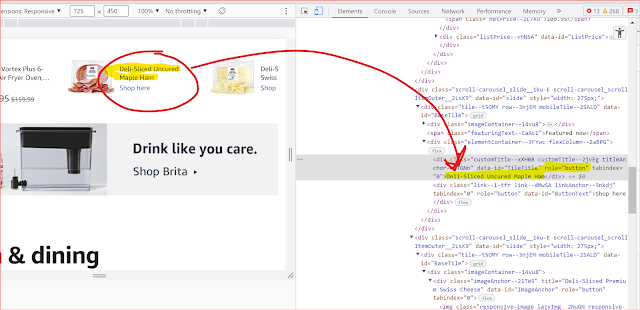
The above amazon example shows how image link should be properly be descriptive. 

Button Links: Button links are links that are represented by a button or other interactive element. To make button links accessible, it's important to ensure that the button has a descriptive label that conveys its purpose or destination. This label should be visible to all users, including those who use assistive technology to navigate the website.

For example, imagine a website that sells movie tickets online. The website has a button link on the homepage that says "Buy tickets now." However, the button link does not have a descriptive label or is not coded correctly, so a user who is blind or has low vision may not know what the button does when they encounter it on the website. Similarly, a user who relies on a keyboard to navigate the website may not be able to interact with the button link if it does not have the proper keyboard focus or does not have a keyboard shortcut associated with it. Without accessible button links, users with disabilities may not be able to complete desired actions on the website, such as purchasing the movie tickets in this example. This can create a negative user experience and may even result in lost business for the website owner. 


Navigation Links: Navigation links are links that are used to navigate between different sections or pages of a website. To make navigation links accessible, it's important to ensure that they are clearly labeled and organized in a logical manner. It's also important to provide alternative navigation methods, such as keyboard shortcuts, for users who cannot use a mouse to navigate the website.


For example, imagine a website that sells computer accessories. The website has a navigation menu with several links, including "Products," "Deals," and "Contact Us." However, one of the links in the menu simply says "Click" A user who is blind or has low vision may not know where the link will take them or what it will do when they encounter it. Similarly, a user who relies on a keyboard to navigate the website may not be able to interact with the link if it does not have a clear label. Without clear labels on navigation links, users with disabilities may struggle to find the content or functionality they need on the website.

Inaccessible links can have a significant impact on ecommerce business revenue by creating barriers for users with disabilities and leading to a negative user experience. Users with disabilities may be unable to access important content or complete desired actions on the website, such as making a purchase or signing up for a newsletter, if the links are not accessible. This can result in lost business and lower revenue growth. Additionally, inaccessible links can also impact a website's search engine optimization (SEO) and rankings, as search engines like Google prioritize accessible websites in their search results. If a website has inaccessible links, it may not be ranked as highly in search results, which can lead to lower traffic and fewer sales. Finally, it is essential to organize navigation links logically and provide alternative navigation methods such as keyboard shortcuts for users who cannot use a mouse to navigate the website. By following these best practices, website owners can create hyperlinks that are accessible to all users and enable them to navigate the website effectively and access the information they need.

Monday, March 20, 2023

WAI ARIA ( Web Accessibility Initiative – Accessible Rich Internet Applications) Reflection

 We all know by definition ARIA is Web Accessibility Initiative – Accessible Rich Internet Applications. According to W3C WAI-ARIA, the Accessible Rich Internet Applications Suite, defines a way to make Web content and Web applications more accessible to people with disabilities. It especially helps with dynamic content and advanced user interface controls developed with HTML, JavaScript, and related technologies.

When not to use ARIA?

  • ARIA should not be used to duplicate the behavior of native HTML features. For example, using ARIA to add a role of "button" to a div element that behaves like a button is unnecessary when the button element itself is already available in HTML.

<div id="saveChanges" tabindex="0" role="button" aria-pressed="false">Save</div>

The above example creates a focusable button, but requires JavaScript and CSS to include button appearance and functionality. These are features provided by default when using the <button> and <input> with type="button" elements:

<button type="button" id="saveChanges">Save</button>

  • ARIA should not be used to add cosmetic effects to elements that do not convey any meaningful. For example, using ARIA to add an animation to an element is unnecessary if it does not provide any valuable information.
  • ARIA should not be used to provide misleading information to users with disabilities. For example, using ARIA to describe an element as "hidden" when it is actually visible can cause confusion. How many of you seen aria-hidden='true' on a focusable element?
  • ARIA should not be used to add unnecessary complexity to the website code.
By using ARIA appropriately on the other hand on appropriate  user interfaces, developers can improve the accessibility of their websites and applications for all users, including those with disabilities.

Some most common scenarios where ARIA been used for providing much needed great user experience :
  • Drag and drop: Gmail allows users to drag and drop emails and attachments to move them between folders or compose new messages.
Image that shpws how Gmail allows users to drag and drop emails and attachments

  • Hashtags and mentions: Instagram uses ARIA to provide additional context and information about hashtags and mentions in posts and comments. 
Image of a source code from Instagram that show how  Instagram uses ARIA to provide additional context and information about hashtags and mentions in posts and comments

  • Carousel sliders: Amazon uses carousel sliders to showcase product images and information on various pages of the website.        
Image that shows Carousel sliders: Amazon uses carousel sliders to showcase product images and information on various pages of the website.
  • on LinkedIn, when we add a new job experience to our profile, there is a drop-down menu where we can select the type of employment (e.g. full-time, part-time, self-employed, etc.). LinkedIn uses ARIA to provide additional information about this drop-down menu to users who are using assistive technology such as screen readers.
Image that shows the source code on LinkedIn, when we add a new job experience to our profile, there is a drop-down menu where we can select the type of employment (e.g. full-time, part-time, self-employed, etc.). LinkedIn uses ARIA to provide additional information
By using ARIA appropriately and sparingly, web developers can help ensure that their websites are accessible and usable for all users, including those with disabilities who are using assistive technology.


Some Useful ARIA Resources:

Saturday, March 18, 2023

Reflection of an experimental Instagram Survey data

Recently I circulated a Higher Ed accessibility survey in Instagram and the result was interesting. This is a reflection of 3 questions.

An experimental Instagram survey can be powerful for several reasons. First of all it is a large and diverse audience. Instagram has a massive user base, with over a billion active users worldwide. This makes it possible to reach a large and diverse audience for a survey, including people from different age groups, geographic locations, and backgrounds. Instagram surveys are easy to access and complete, as they can be completed within the Instagram app. Instagram surveys can provide real-time data collection, in a short time allowing researchers to quickly collect and analyze responses. 

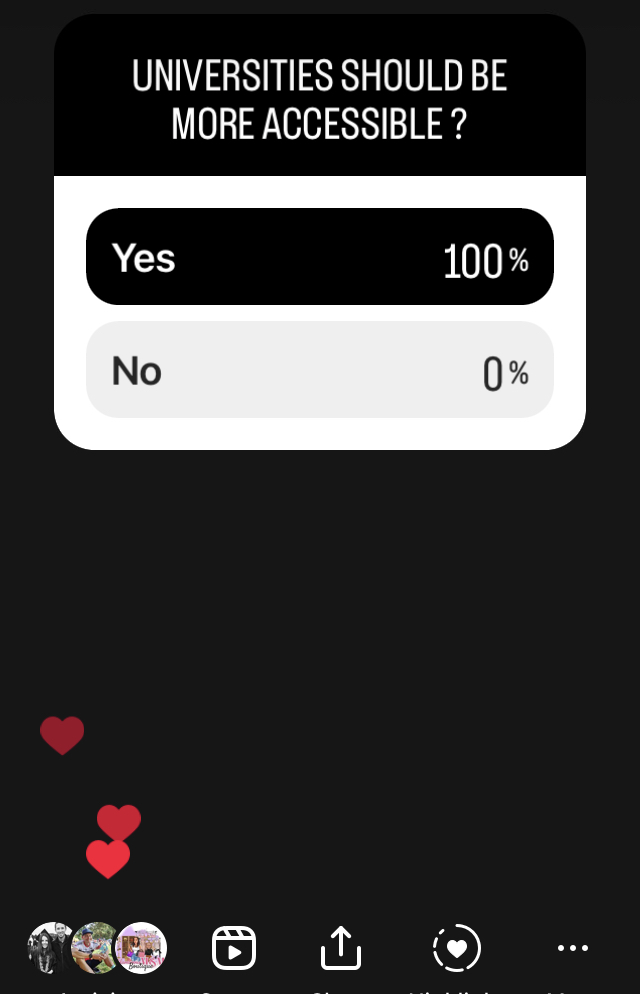
Survey question was Does university need to be more accessible where 100% said yes and 0% replied no. This survey data image is from instagram poll

According to this survey 100% said they believe universities should be more accessible. This data reflects that all the participants in the social media survey believe that universities should be more accessible. It is important to note, however, that this data does not provide any information about the reasoning behind this belief or the specific changes that the participants would like to see to make universities more accessible. Additionally, it is worth considering that this data only represents the opinions of the participants in the survey, and may not necessarily be representative of the wider population's views .


next survey question is assessments should be more accessible where 50% said yes and 50% said no

According to this survey 50% said they believe "assessments should be more accessible" and 50% agree assessments are accessible enough. This data does not provide any information about the specific assessments accessibility issues that participants are concerned about, or the changes they would like to see implemented to improve accessibility. 

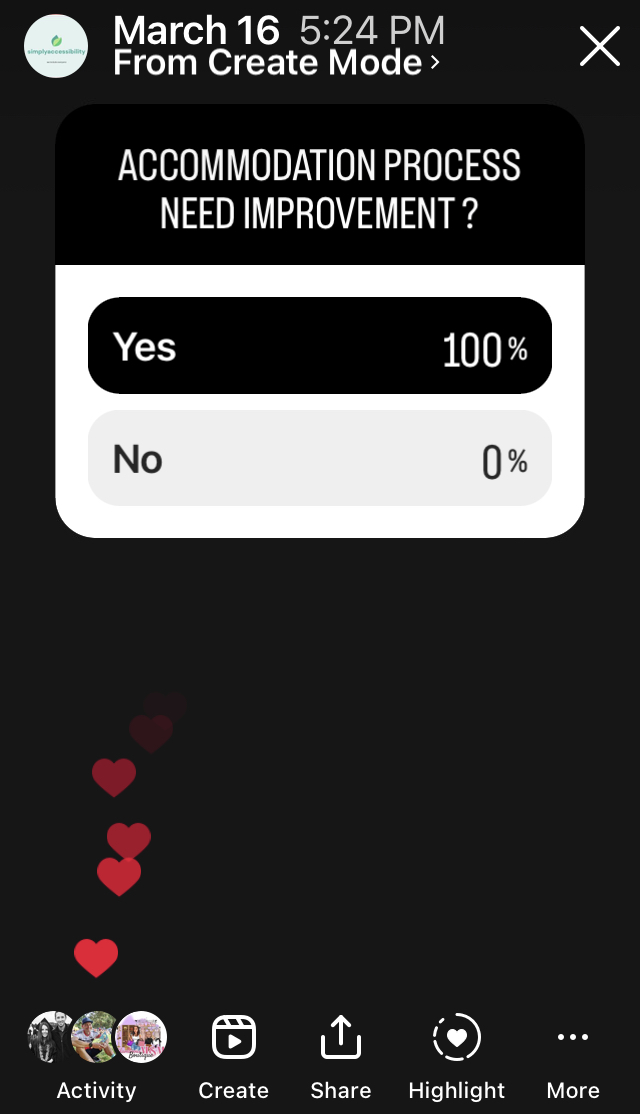
100% replied university accomodation process need improvement

If 100% of the respondents in a social media survey replied that the accommodation process needs improvement, it indicates that there is a widespread and significant issue with the accommodation process. It suggests that people who require accommodations are likely experiencing barriers, challenges, or frustrations when trying to access the accommodations they need.
    The 100% response rate is also significant because it suggests that the issue is not isolated to a small group of individuals, but rather affects everyone who requires accommodations. It may indicate that the current accommodation process is not meeting the needs of the diverse range of individuals who require accommodations, or that there are systemic issues that need to be addressed.

Although there are numerous accessibility automation tools available, as well as conferences, seminars, books, certifications, podcasts, and initiatives, the question of how accessible our surroundings truly are remains a significant concern.
An image of brick with a caption that says -time spent learning is never a waste


Friday, March 17, 2023

WCAG 2.1 A , AA Diagram


WCAG 2.1 Level A, AA guidelines Listed
image copyright: Debjani Roy, CPACC

Most organizations follow WCAG2.1 (Web Content Accessibility Guidelines 2.1) Level A and AA because it is an internationally recognized standard for web accessibility. WCAG2.1 is designed to make web content more accessible to people with disabilities, including visual, auditory, cognitive, and motor disabilities. By following these guidelines, organizations can ensure that their websites and digital content can be accessed by the widest possible audience, including people with disabilities.

Level A and AA are the most commonly followed levels because they address the most basic and important accessibility requirements, such as providing alternative text for images, providing captions for videos, and ensuring that web content can be navigated using a keyboard. These levels also provide a good balance between accessibility and practicality, as they can be implemented without significantly impacting the overall design and functionality of the website.

In addition, many organizations are required by law to comply with accessibility standards, and WCAG2.1 Level A and AA are often referenced in accessibility regulations and guidelines around the world. By following these standards, organizations can avoid legal issues and ensure that they are providing equal access to their digital content for all users.

Thursday, March 16, 2023

What is accessibility violation in Higher Ed ? What are the possible violation points?


Inclusion is intentional. It is about identifying and removing barriers so that everyone can participate to the best of their ability


Accessibility violations can take many forms in Higher Ed, such as inaccessible websites or digital content, physical barriers in buildings or facilities, lack of accessible transportation, or failure to provide reasonable accommodations to individuals with disabilities. 

Inaccessible technology: This is a common reason for lawsuits as students with disabilities require accessible technology to access course materials, websites, and online resources.
    Examples- 
  • Learning management systems (LMS) that do not support screen readers
  •  PDF documents or images that do not have proper alt text or other descriptive information
  •  Websites or web-based applications that are not designed to be keyboard-accessible
  • Videos or multimedia content that do not have closed captions or audio descriptions
  •  Online exams or assessments that are not compatible with assistive technologies
Inaccessible buildings or facilities: Higher education institutions must ensure that their physical facilities are accessible to students with disabilities. This includes accessible entrances, restrooms, classrooms, and other facilities.
    Examples- 
  • Buildings that lack wheelchair ramps or accessible entrances 
  • Restrooms that do not have sufficient space or grab bars
  • Classrooms or lecture halls that do not have wheelchair-accessible seating or assistive listening devices
  • Laboratories or research facilities that lack accessible equipment or workstations
  • Dormitories or housing facilities that lack accessible entrances, elevators, or rooms
Inaccessible transportation: Institutions must ensure that transportation services are accessible to all students, including those with disabilities.
    Examples - 
  • Buses or shuttles that do not have wheelchair lifts or ramps 
  • Public transportation routes that do not have accessible stops 
  • Lack of accessible parking spots for students with disabilities
  • Inadequate signage for accessing and using accessible transportation services
  • Lack of communication or coordination between transportation services and disability services offices
Inaccessible course materials: Institutions must provide accessible course materials to students with disabilities, which may include textbooks, lecture notes, and online resources.
    Examples -
  • Printed materials that do not have alternative formats, such as braille, large print, or audio
  • Inaccessible power point slides
  • Videos or multimedia content that do not have closed captions or audio descriptions
  • Online course content or websites that are not designed to be accessible
  • Assessment materials that are not compatible with assistive technologies, such as screen readers or alternative input devices
Failure to provide accommodations: Institutions must provide reasonable accommodations to students with disabilities, such as extra time on exams, assistive technology, or note-taking assistance.
    Examples - 
  • A student with a visual impairment requests access to course materials in an alternative format, but the institution does not provide the materials
  • A student with a hearing impairment requests a sign language interpreter for a class, but the institution does not provide the interpreter
  • A student with a mobility impairment requests an accessible classroom or laboratory, but the institution does not provide an accessible space
  • A student with a mental health disability requests accommodations such as extended time or a distraction-reduced environment for exams, but the institution denies the request
Inadequate training or awareness: Higher education institutions must ensure that faculty, staff, and administrators are trained in disability awareness and how to provide reasonable accommodations.
    Examples -
  • Faculty members who are not trained on how to design and deliver courses that are accessible to students with disabilities, resulting in inaccessible course materials 
  • Staff members who are not aware of how to make accommodations or who are not trained on the proper use of assistive technologies, resulting in inadequate accommodations for students
  • Administrators who are not aware of their obligations under the law, resulting in policies or practices that are discriminatory or exclusionary.
  • Student services staff who are not trained on how to provide accessible services, resulting in inaccessible campus services such as counseling or career services.
  • Information technology staff who are not trained on how to develop or procure accessible technology, resulting in inaccessible technology systems or websites.
Discrimination or harassment: Institutions may face lawsuits if they engage in discrimination or harassment against students with disabilities.
    Examples -
  • A student with a disability is denied admission or enrollment based on their disability.
  • A faculty member with a disability is denied tenure or promotion based on their disability.
  • A student with a disability is subjected to bullying or harassment by other students.
  • An employee with a disability is denied access to professional development opportunities.
  • A student with a mental disability is disciplined or punished more harshly than other students.
Inaccessible events or activities: Institutions must ensure that events and activities are accessible to all students, including those with disabilities.
    Examples -
  • A conference is held in a venue that is not accessible to attendees with mobility impairments, such as a venue that does not have accessible parking, ramps, or restrooms.
  • A seminar is held in a room that does not have adequate acoustics or sound systems, making it difficult or impossible for attendees with hearing impairments.
  • An event is held with inaccessible materials or formats, such as handouts or presentations that are not available in alternative formats.
Inadequate policies or procedures: Institutions must have policies and procedures in place to ensure that students with disabilities are not discriminated against and that they have access to all educational opportunities.
    Examples -
  • A university does not have a policy in place to provide reasonable accommodations to students with disabilities.
  • A university does not have a policy to ensure that its website or digital content is accessible.
  • An institution does not have a policy to ensure that its facilities are accessible.
  • An institution has policies that limit the use of assistive technologies or accommodations.

Be curious. And however difficult life may seem, there is always something you can do and succeed at

Final Thought - The world can become more accessible through a consistent and intentional approach with mindfulness. When accessibility is integrated into the core values and beliefs of an organization, it no longer feels like a mere job duty but rather a fundamental part of its identity.

Monday, March 13, 2023

Creating assistive-technology-friendly abbreviations


Generally speaking, screen readers do not recognize abbreviations and acronyms, and will read them as if they were regular English words. For example, the acronym "ITS" would not be read by screen readers as "I.T.S.", but rather as "It's". This can lead to confusion and misunderstandings, so it is important to be aware of this limitation when designing webpages and other digital documents.


<body>     <h2>ITS (Information Technology Services) at A.B.C </h2> </body> is not accessible. You need to fully write 'Information Technology services' inside HTML code to make this accessible


Fixing abbreviation in word document

  • Highlight the first instance of “ITS” in the document
  • Press Ctrl + H to open the Find and Replace dialogue box
  • In the Find what field you should now see “ITS” (without speech marks)
  • In the Replace with field type “I T S” (with space)
In the Find what field you should now see “ITS” (without speech marks)In the Replace with field type “I T S” (with space)

End Goal
All instances of ITS throughout your document will now have effectively invisible spaces between their letters, and they will be read out letter-by-letter by all the major assistive technologies.

Manual Testing List

Manual testing requires a person to view and interact with the website or application. This type of testing is often done through user testing with people with disabilities, as they are experts in their lived experience and assistive technology. This is highly recommended, as it allows for an in-depth understanding of how the website or application works and how it can be improved for people with disabilities. 

Manual Testing Checklist 

Allow users to save data after a session timeout

Define status messages in markup

Don't use flashing lights

Get rid of background noise in audio

Describe errors to users

Make all functionality available through the keyboard

Make multiple types of input available

Make sure the user knows where they are

Make sure there are no keyboard traps

Make time limits adjustable or not essential

Prevent errors when handling legal and financial data

Provide ASL interpretation of video

Provide a way to expand abbreviations

Provide a way to pause audio that plays automatically

Provide a way to turn off character key shortcuts

Provide a way to turn off moving content and animation triggered by interaction

Provide a way to zoom in and resize text up to 200%

Provide audio descriptions of videos

Provide captions

Provide consistent UI components

Provide conventional interactions (instead of motion-activated interactions)

Provide media alternatives of video

Provide more than one way to locate a page

Provide pronunciation for ambiguous words

Provide the option to turn off interruptions

Use suggestion for corrections of errors

Use consistent navigation

Use hover and focus best practices

Use responsive layouts 

Use single-pointer gestures

Warn users about timeouts (No surprise to users)

Write descriptive link text   

Write clear instructions 


Saturday, March 11, 2023

How expensive could an accessibility violation be?


Brown colored apothecary scale on a wooden table
Estimate Reading Time  - 10 min

The cost of an accessibility violation can vary greatly depending on a number of factors. These factors include the severity of the violation, the size of the company, the number of people affected, and the jurisdiction in which the violation occurs. Depending on these factors, a company may face a variety of potential costs if they violate digital accessibility standards. These costs can range from minor fines to more substantial legal fees, as well as the cost of making the necessary changes to ensure compliance with accessibility standards. In some cases, companies may even be liable for damages caused by their non-compliance. Ultimately, the cost of an accessibility violation can be significant, and it is important for companies to take the necessary steps to ensure their digital products are accessible to all users.

Legal Fees and Settlement - Companies that do not comply with accessibility standards may be subject to legal action from individuals or advocacy groups. This could lead to costly legal fees and settlements, which can vary greatly in amount. If the violation affects a large group of people, the legal fees and settlements can be especially high. 

Damage to Brand Reputation- Accessibility violations can have a detrimental effect on a company's brand reputation, especially if the violation is brought to the public's attention. This can lead to negative publicity, which can be difficult to recover from. Not only does this have an impact on the company's reputation, but it can also lead to a loss of customers and a decrease in sales. 

Loss of Customer Revenue - If a company's digital assets are not accessible to individuals with disabilities, it can have a significant impact on the company's bottom line. Customers with disabilities may choose to take their business elsewhere, resulting in lost revenue and decreased customer loyalty. This can have a detrimental effect on the company's long-term success.

Cost of RemediationIf a company is found to be in violation of accessibility standards, they may need to invest in remediation efforts to bring their digital assets into compliance. This can be a costly endeavor, as it may involve hiring consultants or developers, purchasing software, and redesigning digital assets. Depending on the severity of the violation, the cost of remediation can be significant, especially if the violation is widespread.

Fines and Penalties - The amount of the fine or penalty can differ depending on the jurisdiction and the seriousness of the violation. For example, a company may face a larger fine if they are found to have willfully disregarded accessibility standards, compared to a company that made an unintentional mistake. It is important for companies to be aware of the accessibility standards in their jurisdiction, as they may face serious consequences if they are found to be in violation.

Graph: ADA Title III Website Accessibility Lawsuits in Federal Court 2017-2022: 2017: 814; 2018: 2,258 (177% increase from 2017); 2019: 2,256 (.01% decrease from 2018), 2020: 2,523 (12% increase from 2019); 2021: 2,895 (14% increase from 2020); 2022: 3,255 (12% increase from 2021). *The number of cases that could be identified through a diligent search.

In summary, the cost of an accessibility violation can be significant, both in terms of legal fees and settlements, as well as the loss of customers and revenue, damage to brand reputation, cost of remediation, and potential fines or penalties. 

How to ensure digital accessibility is maintained in your organization? Is it extremally tricky or achievable ?  

Digital accessibility is an essential component of ensuring that people with disabilities can access and use digital content, such as websites, mobile applications, and other digital assets. The Americans with Disabilities Act (ADA) is a federal law that prohibits discrimination against people with disabilities and requires businesses to make their products and services accessible to everyone, including those with disabilities. To ensure digital accessibility in accordance with the ADA, companies should take the steps like provide clear and understandable instructions for using the digital content, ensure that the content is compatible with assistive technologies, provide alternative text for images, use high-contrast colors for text, and provide captions for videos. Here are some basic thumb rule to ensure ongoing accessibility. 

Conduct an accessibility audit - Companies should perform an accessibility audit of their digital assets to identify any potential accessibility barriers that may exist. 

Create an accessibility policy - Companies should create an accessibility policy that outlines their commitment to accessibility and the steps they will take to ensure that their digital assets are accessible to individuals with disabilities.

Provide alternative formats - Companies should provide alternative formats for digital content, such as audio descriptions, captioning, and transcripts, to ensure that individuals with disabilities can access and use the content.

Use accessible design and development techniques - Companies should use accessible design and development techniques, and follow Perceivable, Operable, Understandable and Robust principles (P.O.U.R)

Train employees on accessibility - Companies should provide periodic training to employees on accessibility guidelines and techniques to ensure that employees been given the knowledge to maintain accessible digital assets.

Conduct ongoing testing - Companies should conduct ongoing testing to ensure that their digital assets remain accessible over time. This testing should be a combination of automated accessibility testing tools and manual testing.

Provide a way for users to report accessibility issues: Companies should provide a clear way for users to report any accessibility issues they encounter.

Here are a few examples of high-profile accessibility violation cases:

Target: In 2008, Target was sued by the National Federation of the Blind for failing to make its website accessible to individuals with disabilities. In 2009, Target settled the case for $6 million and agreed to make its website accessible.

H&R Block: In 2014, H&R Block was sued by the National Federation of the Blind for failing to make its website and mobile applications accessible to individuals with disabilities. In 2016, H&R Block settled the case for $9 million and agreed to make its digital assets accessible.

Netflix: In 2012, the National Association of the Deaf sued Netflix for failing to provide closed captions for its streaming video content. In 2013, Netflix settled the case for an undisclosed amount and agreed to provide closed captions for all of its streaming video content.

Who can inform about a violation? The simplest answer is anyone.

The Department of Justice (DOJ) is responsible for enforcing the Americans with Disabilities Act (ADA) and ensuring that companies comply with digital accessibility standards. Individuals or organizations can contact the DOJ to report a company's digital accessibility violation. Here are a few ways to contact the DOJ:

Online complaint form: The DOJ has an online complaint form where individuals can report accessibility violations. The form asks for information about the company and the nature of the violation.

Phone: Individuals can call the DOJ's toll-free ADA Information Line at 800-514-0301 (voice) or 800-514-0383 (TTY) to report accessibility violations.

Email: Individuals can email the DOJ at ada.complaint@usdoj.gov to report accessibility violations.

Mail: Individuals can send a written complaint to the Disability Rights Section of the Civil Rights Division at the following address:

U.S. Department of Justice
Civil Rights Division
Disability Rights Section
950 Pennsylvania Avenue, NW
Washington, D.C. 20530

When reporting an accessibility violation, individuals should provide as much detail as possible about the violation, including the company's name, website URL, and the nature of the accessibility barrier. The DOJ will investigate the complaint and take appropriate action to ensure that the company is compliant with accessibility standards.

Thursday, March 9, 2023

WCAG 2.1 (Web Content Accessibility Guidelines 2.1) at a glance : 78 Success Criteria (Level A,AA,AAA)

 WCAG 2.1 (Web Content Accessibility Guidelines 2.1) is a set of guidelines developed by the W3C (World Wide Web Consortium) to ensure that web content is accessible to people with disabilities. WCAG 2.1 is an update to the original WCAG 2.0 guidelines and includes additional success criteria to improve accessibility. Some of the key success criteria in WCAG 2.1 include:


Non-text Content: All non-text content that is presented to the user should have a text alternative that serves the same purpose as the non-text content.

Time-based Media: All pre-recorded audio and video content should have captions, and all live audio and video content should have both captions and an audio description.

Adaptable: Content should be presented in a way that is easy to understand and navigate, regardless of the user's abilities or the technology they are using.

Distinguishable: Content should be presented in a way that makes it easy to see and hear, including providing sufficient color contrast, ensuring that text is resizable, and minimizing background noise.

Keyboard Accessible: All functionality should be available through a keyboard interface, allowing users to navigate and interact with content without relying on a mouse.

Enough Time: Users should have enough time to read and use the content, including providing enough time to complete tasks, and avoiding time limits for completing tasks.

Seizures and Physical Reactions: Content should be designed in a way that does not cause seizures or physical reactions in users with photosensitive epilepsy or other sensitivities.

Navigable: Content should be organized in a way that makes it easy to navigate and understand, including using headings, labels, and other organizational tools.

Input Modalities: All functionality should be available through a variety of input methods, including touchscreens, keyboards, and voice commands.

Readable: Content should be presented in a way that is easy to read, including providing sufficient spacing between lines of text, using easy-to-read fonts, and avoiding text that is too small.

Predictable: Make web pages available in a predictable way.

Input Assistance: Help users to avoid and correct mistakes. If an input error is automatically detected, the item that is in error is identified and the error is described to the user in text. If an input error is automatically detected and suggestions for correction are known, then the suggestions are provided to the user, unless it would jeopardize the security or purpose of the content.

Compatible: Maximize compatibility with current and future user agents, including assistive technologies.

29 Success Criteria of Perceivable Listed

Operable, Understandable and Robust success criteria listed


These success criteria are designed to help make web content more accessible to people with disabilities, ensuring that everyone has equal access to information and functionality on the web.

Why we should follow WCAG 2.1 guideline for Digital Accessibility?

Legal Compliance: In many countries, including the United States, following the WCAG guidelines is a legal requirement for public and government websites. Failure to comply with these guidelines can result in legal action against the website owner or operator.

Ethical Responsibility: Making web content accessible to people with disabilities is a matter of social responsibility and ethical considerations. All individuals should have equal access to information and services provided online.

Increased Audience: By following the WCAG guidelines, websites can ensure that they are accessible to a wider audience. This includes people with visual, auditory, physical, and cognitive disabilities who may otherwise be excluded from accessing the website.

Improved User Experience: Web content that is accessible to people with disabilities often has benefits for all users, as it is typically more user-friendly, navigable, and readable.

Future-Proofing: Following the WCAG guidelines ensures that your website will be compatible with future technologies and devices, which is important as technology continues to evolve and expand.

Overall, following WCAG 2.1 guidelines is important to ensure that your website is accessible to all individuals, including those with disabilities. It not only meets legal requirements but also reflects ethical responsibilities and best practices for creating a better online experience for all users.